 Speed Patterns


Use Styles Instead Of Images
Visual effects that originate in design tools — drop shadows, gradients, rounded corners, decorative borders, even small icons — are often shipped to the browser as raster images. They didn't have to be. CSS can express most of those effects directly in markup, at a tiny fraction of the byte cost and with no loss of fidelity.
The Problem
A typical handoff path looks like this: the designer builds a mockup in Figma or Photoshop, exports the visual elements as PNG or JPEG, and the developer drops the exports into the page. The result looks right, but it's expensive:
- A drop shadow exported as a PNG can be 40–100 KB. The same shadow in CSS is a few bytes
- A button rendered as an image is one network request, one rasterization step, and one fixed resolution. The same button in CSS scales to any DPI for free
- A "hero" image with overlaid text saves time at design handoff but binds the text into the pixels — making it un-translatable, un-selectable, and bad for SEO
Every image is a network round-trip, a decode step on the user's CPU, and a layout consideration. Avoiding the round-trip entirely is almost always cheaper.
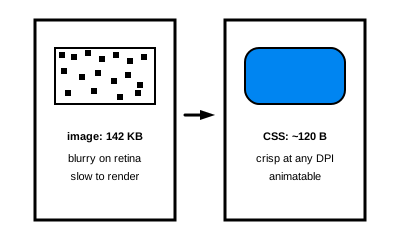
The same visual element shipped two ways: as a 142KB raster image, or as ~120 bytes of CSS. The CSS version is also crisp at any DPI and animatable.
Solution
Make CSS the default for any visual element that isn't fundamentally photographic. Reach for an image only when the content is a real photo or a complex illustration that CSS truly can't express.
What CSS handles well
- Shadows —
box-shadow,text-shadow,filter: drop-shadow() - Rounded corners —
border-radius(including elliptical and per-corner values) - Gradients — linear, radial, conic, with stops and color interpolation
- Borders and dividers — solid, dashed, dotted, double, with custom widths and colors
- Backgrounds and overlays — multiple backgrounds, blend modes, masks
- Icons — most simple icons are better as inline SVG (resolution-independent and styleable) than as PNG sprites
- Animations and transitions — hover effects, fades, slides, pulses
- Typography effects — letterspacing, alternating colors, decorative underlines
If your designer says "I want this corner rounded with a soft shadow and a thin border" — that's three lines of CSS and zero images.
Anti-pattern: the mixed hero
A common offender is a hero banner that combines a photographic image with overlaid text. Designers often deliver this as a single rendered image — and the result is bad on both axes:
- PNG preserves the text edges crisply but bloats the photographic part
- JPEG compresses the photo well but introduces visible artifacts around the text
The right answer is to split the layers: keep the photo as a compressed image and render the text as real HTML positioned over it. The photo can be aggressively compressed (it's only being judged as a photo). The text stays crisp, accessible, responsive, and editable without shipping a new image.
Why This Works
CSS rules are part of the stylesheet — already cached, already parsed, already applied to many elements. Replacing an image with CSS:
- Eliminates a network request (or several, if multiple sizes were being served)
- Eliminates the decode and rasterization cost
- Lets the browser scale the visual to any device pixel ratio without blurriness
- Allows hover, focus and animation states without preloading additional image variants
- Keeps text editable and indexable
Guidelines
- Default to CSS. Make "could this be done in CSS?" a routine question during design review, not an afterthought during optimization
- Use SVG for icons and simple illustrations. Inline SVG can be styled with CSS and animated, and stays sharp at every resolution
- Reserve raster images for actual photographs — and use modern formats (
AVIF,WebP) with propersrcsetandsizesfor responsiveness - Don't ship text as pixels. Text is content; it belongs in HTML
- Tooling helps. Modern CSS supports complex effects that were once only achievable with images — re-investigate the boundary periodically
Related Patterns
- Fast Start — fewer bytes and fewer requests directly improve First Contentful Paint
- Immutable Layout — CSS-rendered visuals know their dimensions immediately, so they don't shift
Technical Implementation
Splitting the mixed hero
The mixed-hero anti-pattern is fixed by separating the photographic layer from the typographic one:
<section class="hero">
  <img src="/assets/hero-photo.jpg" alt="" class="hero__photo" />
  <div class="hero__copy">
    <h1>Crisp, real text</h1>
    <p>Selectable, translatable, accessible.</p>
  </div>
</section>
.hero {
position: relative;
}
.hero__photo {
width: 100%;
height: 100%;
object-fit: cover;
}
.hero__copy {
position: absolute;
inset: 0;
display: grid;
place-content: center;
color: white;
text-shadow: 0 2px 6px rgba(0, 0, 0, 0.5);
}Each layer is now optimized for its own job: the JPEG can compress freely, and the text remains crisp, indexable and translatable.
CSS instead of decorative images
Most decorative effects that once required images are direct CSS now: box-shadow, border-radius, linear-gradient(), radial-gradient(), conic-gradient(), backdrop-filter, mask-image and the filter family cover almost all of what design tools export. When in doubt, prototype the effect in CSS first; only fall back to a raster export if the browser truly can't reproduce it.